Using Google Maps in Korea is the most common mistake foreigners make. You have just landed in Seoul, open the app, and see “No Route Found.”
Why does Google Maps in Korea fail? Due to local security laws, it cannot provide walking or driving directions. To survive here, you need a local map app.
Due to local security laws regarding North Korea, Google Maps does not work properly for walking or driving directions. To survive in Korea, you must download a local map app. This guide will compare Google Maps vs Naver Map and show you how to use them.
The Proof: Google Maps vs. Naver Map
Don’t believe me? Let’s look at a real example I tested at Dongtan Station. This area was recently renovated, so it is the perfect place to test map accuracy.
I searched for the exact same walking route on both apps. Look at the difference below.
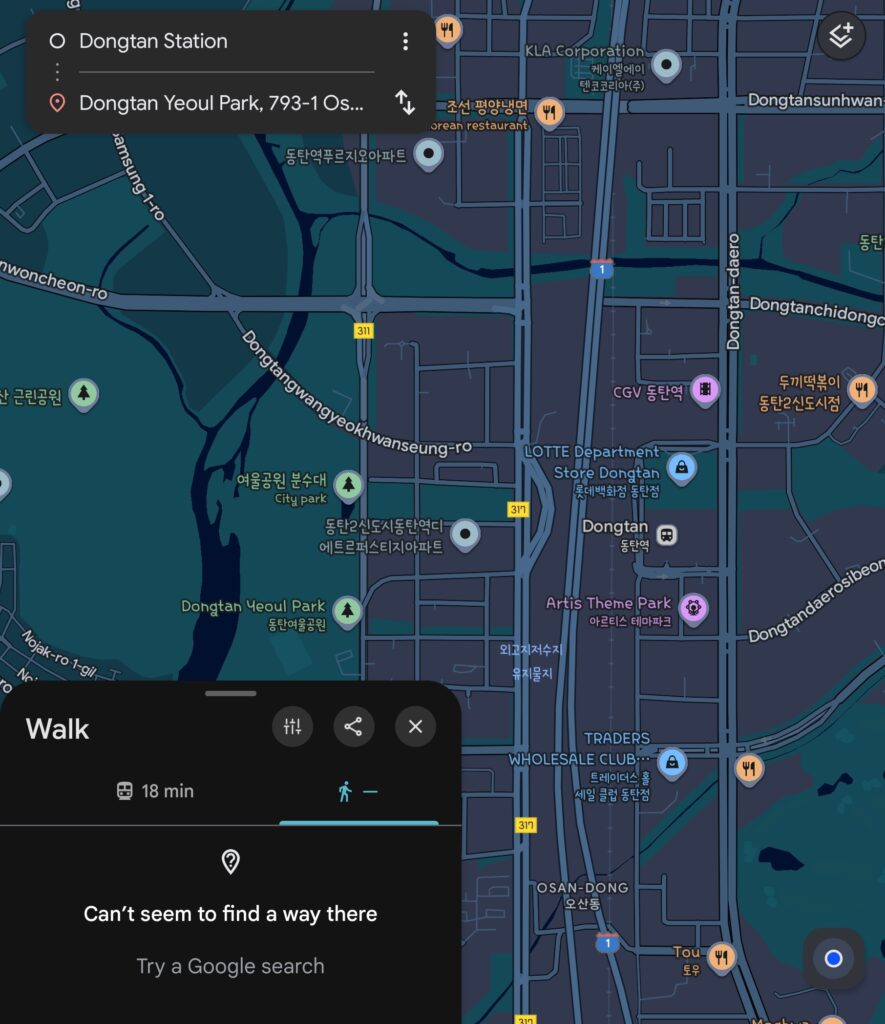
❌ Google Maps: “Can’t seem to find a way there.” It completely fails to calculate the walking path. If you rely on this, you will be stranded.
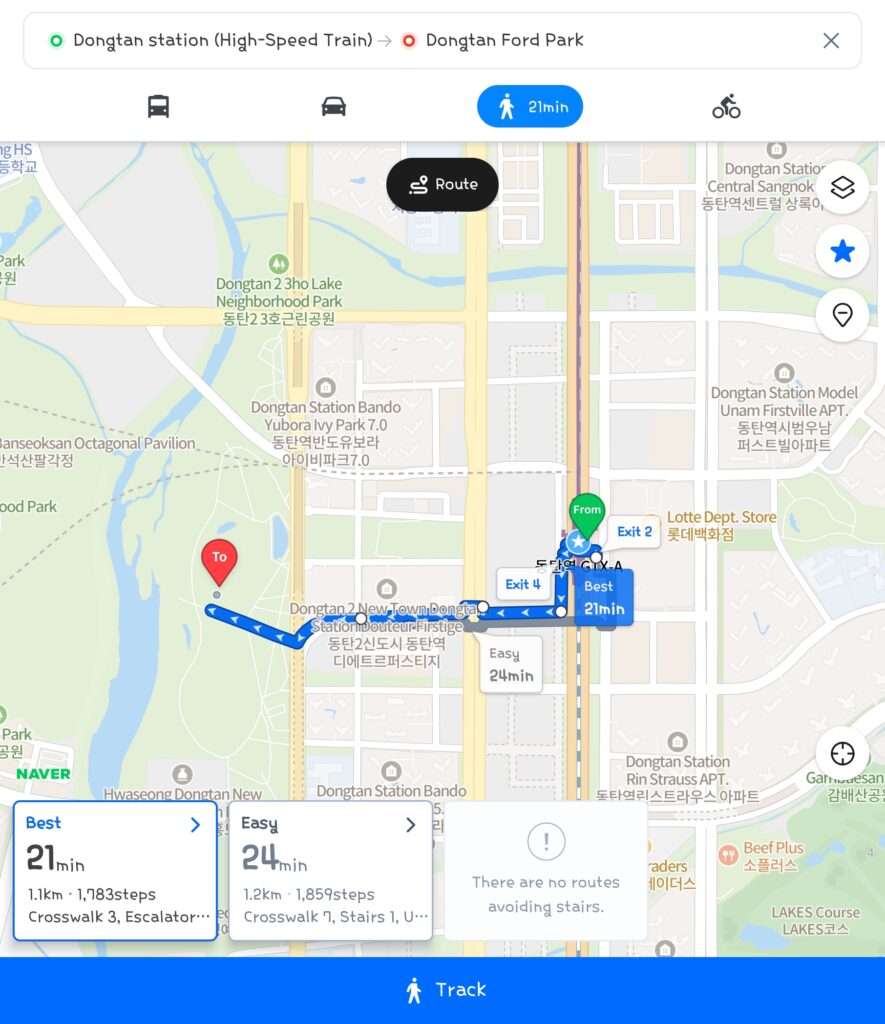
✅ Naver Map: Perfectly shows the 21-minute walking route with the correct Exit 4. It even shows crosswalks and stairs.
Editor’s Pick: How to Use Naver Map in English 🇺🇸
The best alternative is Naver Map (Naver Map). It is the “Google Maps of Korea.” The good news is that it supports English, Chinese, and Japanese. However, the default setting might be in Korean when you first download it.
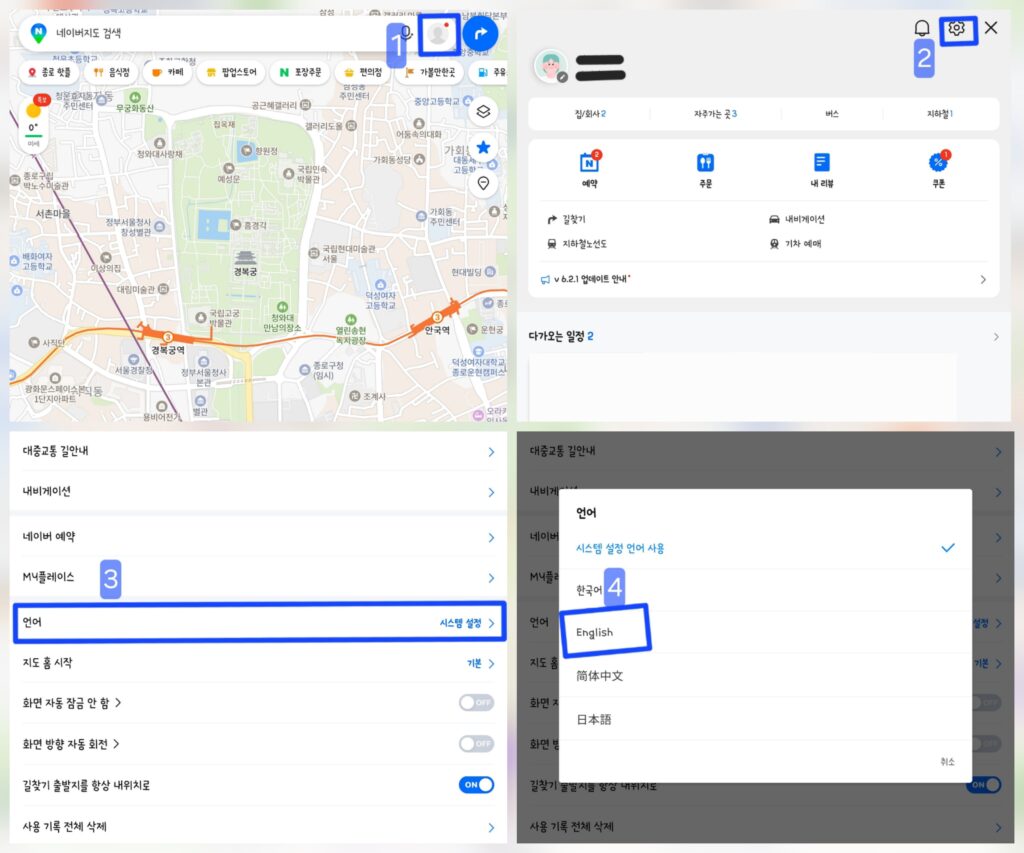
Here is the step-by-step guide to unlock English Mode:
- Open the App and tap the Menu (≡) icon on the top left.
- Tap the Settings (⚙️ Gear Icon) at the top right.
- Scroll down and find the Language menu.
- Select English. The app will restart in English mode.
Why Naver Map is the King 👑
Why do 90% of Koreans use Naver Map? It is not just about navigation. It is a super-app.
- Real-time Transit Info: It tells you exactly when the bus or subway is coming, down to the second.
- Real Local Reviews: Google Maps reviews are mostly from tourists. Naver Map has millions of honest reviews from locals. (Tip: Look at the photos even if you can’t read Korean!)
- Accurate Walking Navigation: It knows every small alley, underpass, and shortcut that Google misses.
📥 Download Naver Map:
🤖 Android (Google Play)
🍎 iOS (App Store)
Alternative: KakaoMap
Another great option is KakaoMap. If you plan to use Kakao T (Taxi App) often, this might be more convenient because they are linked together.
📥 Download KakaoMap:
🤖 Android (Google Play)
🍎 iOS (App Store)
FAQ: Using Maps in Korea 🇰🇷
Here are common questions from travelers about Google Maps in Korea.
Q: Does Waze work in Korea?
A: Not really. Waze relies on Google’s map data, so it suffers from the same issues. Stick to Naver or Kakao.
Q: Can I use Apple Maps?
A: Apple Maps is getting better, but it still lacks detailed information on small restaurants, bus timings, and opening hours compared to local apps.
Q: Is Naver Map free?
A: Yes, it is 100% free to download and use.
Q: Do I need a Korean phone number to use these apps?
A: No. You can use them with just WiFi or a data SIM card.
Conclusion: Don’t Rely on Google Maps in Korea
To enjoy your trip without getting lost, trust the local apps like Naver Map. If you keep trying to use Google Maps in Korea, you will waste time and get lost.
Mastering Naver Map is the first step to becoming a pro traveler. Don’t let Google Maps in Korea ruin your schedule!